


Nowadays many of the electronic devices have become an integral part of our lifestyles. Hence, the question “Can I carry my laptop to Ladakh?” has become one of the most common queries on my blog, and I completely understand why. If you are a remote worker, a photographer backing up thousands of RAW files, or a student who simply cannot travel without a laptop, you need clear answers before you head into the high Himalayas.
The short answer is: yes, you can carry your laptop to Ladakh, but you need to take specific precautions. The thin air at high altitudes, the extreme cold, the rough roads, and the sudden temperature swings can all damage your devices if you are not careful. In this guide, I will walk you through everything you need to know, from HDD vs SSD risks to power management, waterproofing, drone rules, and more. Keep reading if you want your electronics to survive Ladakh in one piece 🙂
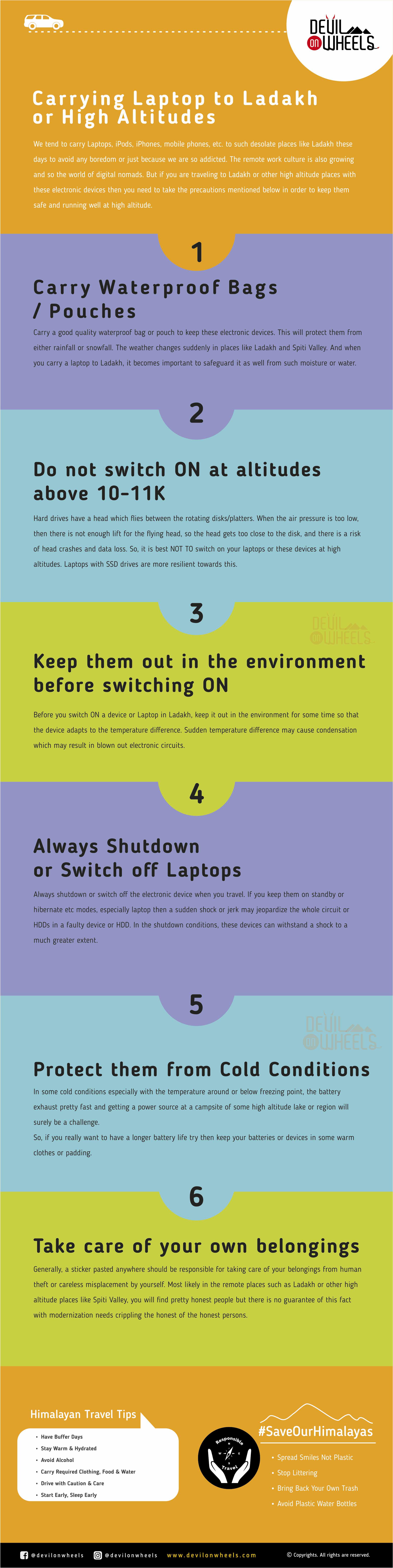
Download your FREE high-resolution PDF copy of this infographic guide for carrying a laptop to Ladakh or Spiti Valley. If you found it helpful, please feel free to share it with your fellow travelers.
Quick Answer: You can carry a laptop to Ladakh. If it has a traditional HDD, do NOT switch it on above 10,000 feet (3,000 m) as the low air pressure can crash the read head. SSD laptops (MacBooks, most modern thin laptops) are safe to use at any altitude. Always shut down fully before travel, use waterproof bags, and acclimatize the device to temperature before powering on. Power banks and phones with modern chipsets handle altitude fine with normal care.
Practical Info Box
Best time to travel Ladakh with electronics: June to September (stable weather, lower chance of snow exposure)
Highest risk zones for HDD laptops: Khardung La (17,582 Ft), Taglang La (17,480 Ft), Pangong Tso (14,270 Ft), Hanle (14,764 Ft)
SSD safe: Yes, at any altitude in Ladakh
HDD safe: Only below 10,000 Ft (3,000 m), i.e., Leh city and lower valleys
Drone flying: Heavily restricted in Ladakh (border zone). DGCA clearance + local Army permission required.
Nearest electronics repair: Leh main market (limited repairs; no Apple service centre in Leh)
Let's quickly dive into the details:
Why Does High Altitude Affect Laptops and Electronics?
Before we get into the tips, it helps to understand what actually happens to electronics at high altitude. Most people focus on altitude sickness for themselves, but the thin air affects your devices too. As you climb higher, atmospheric pressure drops. At Leh (11,520 Ft), the air pressure is already significantly lower than at sea level. At Khardung La (17,582 Ft), it is even thinner.
For most electronic devices, this is not a problem. Phones, SSDs, cameras, and power banks work fine. The trouble arises specifically with traditional Hard Disk Drives (HDD), which rely on a tiny read head that “flies” over spinning platters on a cushion of air. When air pressure is too low, that cushion disappears. The head gets too close to the disk, risks contact, and you get what engineers call a “head crash,” which usually means permanent data loss. This is not a theoretical risk. It happens. And when it happens in Ladakh, there is no data recovery centre for 500 km.
Temperature is the other big factor. Ladakh nights can drop to -10°C even in summer at high campsites. Batteries lose charge faster in cold, condensation can form on cold circuits when you suddenly move them to a warm room, and thermal shock can damage solder joints in older devices.
Is Your Laptop Safe? SSD vs HDD — The Most Important Check
This is the single most important thing to check before your trip. Open your laptop’s manual, or simply Google your laptop model + “storage type.”
If your laptop has an HDD (Hard Disk Drive): These are found in older laptops, budget laptops, and most mid-range laptops bought before 2018. They are the ones at risk above 3,000 meters (10,000 feet). Do NOT switch on an HDD laptop at any point above Leh city when you are in the high-altitude zones of Ladakh: passes, Pangong, Nubra (higher campsites), Hanle, Tso Moriri, etc. Use it only in your hotel/guesthouse in Leh, which sits at a manageable 11,520 Ft. Even then, it is right at the threshold. I would back up all data before leaving home and leave the backup behind.
If your laptop has an SSD (Solid State Drive): SSDs have no moving parts. They store data in flash memory chips, the same way your phone does. Hence, there is no flying head, no pressure dependency, and no altitude-related risk for the drive itself. Most MacBooks (since 2013), modern thin-and-light laptops (Dell XPS, HP Spectre, Lenovo ThinkPad X series from 2018 onwards), and almost all laptops sold since 2020 come with SSDs. If you are buying a new laptop before a Ladakh trip, get one with an SSD. The performance is also significantly better.
Pro Tip: If you are unsure whether your laptop has SSD or HDD, open Task Manager on Windows (Ctrl + Shift + Esc), go to Performance, click on “Disk.” It will say “SSD” or “HDD.” On Mac, click the Apple logo, “About This Mac,” “System Report,” then “Storage.” Most modern Macs say “Flash Storage” which is SSD.
What Are the Complete Guidelines for Carrying a Laptop to Ladakh?
Whether you have an SSD or HDD, the following guidelines apply to all electronic devices you carry to Ladakh or other high-altitude Himalayan regions like Spiti Valley, Zanskar, or Pangi Valley. Follow these and your devices will stay safe.


1. Should You Carry a Waterproof Bag or Pouch?
Yes, absolutely. Electronic devices are not waterproof, and the weather in Ladakh changes very suddenly. A clear sky at 10 AM can turn into a hailstorm or snow flurry by noon at the high passes. Rain is rare at Leh city level but not unheard of. And if you are carrying a laptop through mountain terrain, the sweating from cold containers (condensation on the outside of your bag) can also be a problem.
Carry a good quality waterproof bag or a laptop-specific waterproof sleeve. Hard-shell laptop cases offer the best protection from both water and physical shocks on rough roads. Keep in mind, Ladakh roads, especially on the Manali – Leh Highway, can be brutally corrugated and full of potholes. Your bag will take a beating in any vehicle. A rigid, waterproof, shock-resistant case is worth the extra weight.

2. Why Should You NOT Switch On Your HDD Laptop Above 10,000 Feet?
I have already explained the physics above, but here is the practical rule: the manufacturer-rated safe operating altitude for most HDD laptops is up to 3,000 meters (roughly 10,000 feet). Leh itself sits at about 11,520 feet. Hence, once you get to Leh, you are technically already past the rated limit for HDD operation, though many people do use them in Leh without issues since the drop from sea level has been gradual. The real danger is when you start going higher: Khardung La at 17,582 Ft, Taglang La at 17,480 Ft, Pangong Tso at 14,270 Ft, Hanle at 14,764 Ft, Tso Moriri at 14,836 Ft. If you have an HDD laptop, do not switch it on at these locations.
Now, if you have an SSD laptop, you are free to use it anywhere. SSD laptops like MacBooks are rated for altitudes well above 5,000 meters (16,400 feet) with no storage risk. So if you are a digital nomad working from Hanle or doing a remote meeting from Pangong, an SSD laptop is fine. An HDD laptop is not.
If you are going with an HDD laptop, take a full backup of all data before leaving home. Leave the backup drive at home, not in your bag. And consider using cloud backup (Google Drive, iCloud) as a second layer before you leave. If your drive crashes in Ladakh, you will want that backup.
3. How Do You Acclimatize Your Device Before Switching On?
Before you switch on the device in Ladakh, keep it out in the environment for 5-10 minutes so that the device can adapt to the temperature around it. Sudden temperature differences cause condensation, which can result in blown-out electronic circuits.
Here is a common scenario that damages electronics: you keep your phone or iPod deep in a warm, padded pocket. You reach a freezing cold summit or campsite. You immediately pull it out and switch it on. The cold hits the warm device and moisture condenses on the internal components. That moisture can short out the circuit. The fix is simple: take the device out of your warm pocket, let it sit in the outside environment for 5-10 minutes, and then switch it on. This applies to phones, cameras, laptops, and any other device that you have been carrying close to your body for warmth.
Travel Tip: If you are driving yourself to Ladakh, do not forget to check the 40 must-have things to carry on a self-drive trip to remote Himalayas. Electronics are one category, but there is a lot more to prepare for.
4. Why Must You Always Fully Shutdown Your Laptop During Travel?
Always shut down your laptop completely before you put it in your bag and start traveling. Do not leave it in sleep, hibernate, or standby mode. The reason is simple: in standby or sleep mode, the HDD is still partially active, the read head is still in a semi-ready position, and a sudden jerk or shock from the road can cause it to crash against the platter. In full shutdown, the head parks safely, and the device can withstand much greater physical shocks.
This matters a lot on Ladakh roads. Whether you are on the Manali – Leh Highway, the Leh to Nubra Valley road, or the road to Pangong Tso, you will encounter stretches that are genuinely rough. Jeeps bounce, bikes vibrate, and even SUVs take hard hits on washboard corrugations. A fully shut-down laptop handles all of this much better than one left in sleep mode.
5. How Do You Protect Batteries from Cold Weather in Ladakh?
Battery performance drops significantly in cold temperatures. At Ladakh campsite temperatures of -5°C to -10°C (common at Pangong, Tso Moriri, and Chandratal), your laptop battery may drain 30-50% faster than normal. Your phone battery can drop from 60% to 10% seemingly within minutes in extreme cold.
Here is what works: keep your batteries or devices wrapped in warm clothing or padding when not in use. If you are camping, sleep with your phone in your sleeping bag. Keep the power bank in your inner pocket close to your body during long drives. Charge everything fully at every opportunity, because power points at remote homestays and campsites are not guaranteed, especially during load shedding hours. Many campsites at Pangong, for instance, run generators only in the evening, usually from 6 PM to 10 PM. Keep this in mind when planning your charging schedule.
As for carrying a power bank: yes, definitely carry one. I always suggest a 20,000 mAh power bank for Ladakh trips, enough for 4-5 full phone charges. Keep in mind that airlines allow power banks up to 27,000 mAh (100Wh) in carry-on only, not checked baggage. So if you fly to Leh, pack the power bank in your cabin bag.
6. Should You Worry About Theft in Remote Areas Like Ladakh?
Ladakh, Spiti, and most remote Himalayan villages are known for being incredibly honest communities. In my experience traveling through Ladakh over the years, I have not encountered theft as a problem. The local culture, deeply rooted in Buddhist values, makes these places some of the most trustworthy you will visit in India. However, no place is completely free from the risk of opportunistic theft or careless misplacement, and modernization changes things slowly everywhere. So the usual common-sense rules apply: do not leave expensive devices unattended in public spaces, keep your laptop bag with you on shared transport like buses or tourist minibuses, and use hotel locker facilities if available. Most homestays in Ladakh are run by families and are completely safe.
What About Other Electronics in Ladakh — Phones, Cameras, Drones, Power Banks?
The laptop guide above is the most critical, but you are probably carrying a lot more than just a laptop to Ladakh. Let me cover the other common electronics:
Can I Use My Smartphone Normally in Ladakh?
Yes, smartphones handle high altitude fine. Modern phones use NAND flash memory (the same technology as SSDs), so there is no altitude-related storage risk. The main concerns are battery drain in the cold (covered above) and mobile network coverage, which is patchy in Ladakh. BSNL postpaid offers the widest coverage in remote areas like Nubra, Pangong, and the Manali – Leh Highway. Jio and Airtel work well in Leh city and on major highways. Vi (Vodafone-Idea) is limited to Leh city. For full details, check the guide on mobile phone connectivity in Leh Ladakh.
Is My DSLR or Mirrorless Camera Safe at High Altitude?
Yes, cameras are completely safe at high altitude. Modern DSLRs and mirrorless cameras do not have any pressure-sensitive components. The lenses, sensors, and autofocus motors all work fine. The only concerns are battery life (bring 2-3 spare batteries, charge all of them every night) and condensation (the same 5-10 minute acclimatization rule applies when moving from a warm bag to cold outdoor air). If you are shooting video at 4K, your camera’s internal storage or SD card is flash-based, so no altitude issues there either.

One specific tip for camera protection: carry your camera in a padded hard case or a good quality camera bag with internal dividers. The roads in Ladakh will shake everything in your vehicle, and a camera bouncing around in a loose bag can get damaged. Also carry a UV filter on every lens, as the dust in Ladakh is very fine and gets everywhere.
Can I Fly a Drone in Ladakh?
This is a very important question and the answer is: drones are heavily restricted in Ladakh due to the sensitive border zone. A large portion of Ladakh falls within 25 km of international borders (Pakistan and China), which is classified as a Red Zone under India’s drone regulations. Flying a drone in a Red Zone without explicit clearance from the Bureau of Civil Aviation Security (BCAS), Ministry of Defence, and local Army authorities is illegal and can result in confiscation of your equipment, fines, and even detention.
Even the popular tourist spots like Pangong Tso, Nubra Valley, Tso Moriri, and Hanle fall under restricted airspace. Some travelers try to get away with flying nano drones (under 250g, like the DJI Mini series) assuming these are exempt, but the exemption only applies to designated Green Zones. Most of Ladakh is not a Green Zone. My strong recommendation: do not carry a drone to Ladakh unless you have explicit written authorization. The Army presence in the region is significant, and your equipment will be confiscated at the first checkpoint. The landscape is better experienced in person anyway 🙂
What About Power Banks, Bluetooth Speakers, and Other Gadgets?
Power banks, Bluetooth speakers, headphones, e-readers, and other small gadgets are all safe at high altitude. They all use flash-based storage and solid-state components. The only consideration is temperature: keep them warm when not in use. For power banks, here are the key rules for air travel: airlines allow power banks up to 100Wh (27,000 mAh at 3.7V) in carry-on baggage only. Power banks are NOT allowed in checked baggage. If you are flying to Leh, pack your power bank in your cabin bag.
One thing I always recommend for Ladakh: carry a multi-port USB charging hub and a universal travel adapter. The power supply in remote guesthouses can sometimes be 2-pin, and having an adapter saves you from hunting for compatible sockets. When you do get electricity, charge everything simultaneously so you can maximize the charging window.
Tips for Digital Nomads Traveling to Ladakh
More and more travelers are working remotely from Ladakh these days. If you are one of them, here is what you need to know beyond just device safety.
Where to work from: Leh city has several cafes with decent Wi-Fi, though speeds are not fast enough for large file uploads or video calls consistently. The best option for reliable connectivity is to stay in a guesthouse or hotel with dedicated internet and work from your room. Outside Leh, reliable internet essentially does not exist. Nubra, Pangong, Hanle, and the remote valleys have at best intermittent BSNL mobile data. Do not plan to work from those locations unless you are okay with completely offline work.
Backup your work constantly: Before you leave connectivity zones, back up to a local drive or cloud. In a remote area, if your hard drive fails, you cannot restore from cloud until you return to connectivity. Local drives (USB SSDs, ideally) are your best friend.
Acclimatize before you work: Altitude affects your brain, not just your devices. AMS (Acute Mountain Sickness) causes headaches, brain fog, and inability to concentrate. The standard acclimatization protocol recommends resting for 24-48 hours after arriving in Leh before doing any strenuous activity or demanding mental work. If you have a deadline, plan your itinerary around the rest day in Leh. Trying to write code or manage a project while AMS is hitting you is not productive or safe.
Pack light on devices: Every device is additional weight and additional risk. I avoid taking too many electronics to Ladakh. The more connected you are, the less you actually see of the place. Since flash memory cards for cameras are cheap now, you can bring multiple cards and avoid the need for a laptop just for photo backup. A 256GB SD card is inexpensive and holds thousands of RAW files. Think about whether you actually need the laptop before packing it.
Complete Electronics Checklist for Ladakh — What to Pack and What to Leave Behind
Here is a practical summary to help you pack smarter for Ladakh. Check this against the complete things to carry while traveling guide for a broader packing list.
| Device | Safe at High Altitude? | Key Precaution |
|---|---|---|
| SSD Laptop (MacBook, etc.) | Yes | Waterproof bag, full shutdown during travel |
| HDD Laptop | Risky above 10,000 Ft | Do NOT switch on above 10,000 Ft. Back up data before leaving. |
| Smartphone | Yes | Keep warm in cold. BSNL SIM for remote coverage. |
| DSLR / Mirrorless Camera | Yes | Acclimatize before switching on. Carry spare batteries. |
| GoPro / Action Camera | Yes | Acclimatize before switching on. Use multiple SD cards. |
| Power Bank (up to 27,000 mAh) | Yes | Keep warm. Carry-on only if flying. |
| Drone | Technically yes, but illegal to fly | Red Zone restrictions. Do not carry unless you have clearance. |
| External SSD | Yes | Use instead of HDD for backup. Waterproof case recommended. |
| External HDD | Risky above 10,000 Ft | Same risk as HDD laptop. Do not operate at altitude. |
| E-reader (Kindle, etc.) | Yes | Keep warm. Charge at every opportunity. |
You should always carry your water bottle and refill it as many times as you need water. It will not only keep you hydrated always, but you will also help in saving the Himalayas from plastic garbage. Remember, every tiny step counts and your step in this direction can help save the Himalayas too !! 🙂 🙂
Don’t have time to read the full article? You can check this short video on Discover With Dheeraj YouTube Channel on this topic. If you like my video, please do not forget to SUBSCRIBE to my YouTube channel.
Conclusion
There is no harm in carrying a laptop or other electronics to Ladakh, as long as you understand the risks and take the right precautions. The most important thing is to know whether your laptop has an HDD or SSD before you go. If it is an HDD, do not switch it on above 10,000 feet and back up all data before leaving. If it is an SSD, you have much more flexibility. For everything else, waterproofing, cold protection, full shutdown during travel, and device acclimatization are the key habits to build.
Personally, I avoid taking too many electronics when I travel to Ladakh. The whole point of going there is to disconnect from screens and reconnect with the mountains, the culture, and the people. With cheap and large flash memory cards available now, the backup argument for carrying a laptop has also reduced significantly. But if you are a remote worker or you genuinely need the laptop, go ahead and carry it, just follow the precautions in this guide.
If you have any questions about carrying your specific device to Ladakh, or if you have had your own experience (good or bad) with electronics at high altitude, I would love to hear from you. Feel free to share it in the comments below, so it can help fellow travelers planning their own trips. The DwD Community is always here to help 🙂 …
Also, feel free to check the solo trip to Ladakh guide and the things to consider for your Ladakh trip for more preparation tips. Safe travels, my friend!

Have a travel question?? You can subscribe to my YouTube channel and leave a comment to ask your travel questions about traveling to the Himalayas.
If you know your friends or family are planning a trip to Ladakh, do share this article with them to help them make a memorable Ladakh trip.
Frequently Asked Questions
Can I carry my laptop to Ladakh?
Yes, you can carry a laptop to Ladakh. If it has a traditional HDD (Hard Disk Drive), do not switch it on above 10,000 feet (3,000 m) due to the risk of head crashes in thin air. If it has an SSD (Solid State Drive), it is safe to use at any altitude in Ladakh. Always shut down fully before travel, use a waterproof bag, and back up all data before leaving.
Is it safe to use a MacBook in Ladakh?
Yes, MacBooks use SSD storage and are safe to use at any altitude in Ladakh, including at Khardung La (17,582 Ft) or Pangong Tso (14,270 Ft). The main precautions are battery management in cold weather and acclimatizing the device to outside temperature before switching on after carrying it in a warm bag.
Will my laptop hard drive fail at high altitude?
Traditional HDD laptops have a rated operating altitude of around 3,000 meters (10,000 feet). Above this, the thin air cannot support the read head properly, risking a head crash and data loss. SSD laptops have no such limit and are safe at all altitudes found in Ladakh. If you are not sure which type your laptop has, check Task Manager (Windows) or System Report (Mac).
Can I fly a drone in Ladakh?
Drones are heavily restricted in Ladakh. Most of the region falls within the Red Zone (within 25 km of international borders), where drone flying without explicit clearance from the Ministry of Defence, BCAS, and local Army authorities is illegal. Even nano drones under 250g are not automatically exempt in Red Zones. Carrying a drone without clearance risks confiscation and legal trouble.
Can I carry a power bank to Ladakh on a flight?
Yes, but only in carry-on baggage. Airlines allow power banks up to 100Wh (approximately 27,000 mAh at 3.7V) in cabin baggage only. Power banks are not allowed in checked baggage. If you are flying to Leh, make sure your power bank is in your cabin bag, not your check-in luggage.
How do I protect my phone battery in Ladakh’s cold weather?
Cold temperatures reduce battery capacity significantly. Keep your phone and power bank in inner pockets close to your body, especially during long drives or outdoor activities. At campsites, sleep with your phone inside your sleeping bag if temperatures drop below freezing. Charge everything fully every evening, as power availability can be limited to generator hours (typically 6 PM to 10 PM at remote campsites).
Is there any mobile network or internet in Ladakh for remote work?
Leh city has BSNL, Jio, and Airtel coverage with reasonable data speeds for basic work. Outside Leh, coverage is patchy. BSNL postpaid offers the widest coverage in remote areas. Nubra, Pangong, Hanle, and Zanskar have intermittent or no connectivity. For remote work, Leh city is the only practical base. Plan offline work periods for when you leave Leh for sightseeing.
What is the best way to back up photos without a laptop in Ladakh?
Carry multiple high-capacity SD cards (128GB or 256GB each) and simply swap cards rather than backing up. A 256GB SD card can hold thousands of RAW files and is much lighter and safer than a laptop. You can also carry a portable SSD with a card reader for direct card-to-drive backups. Some photographers use smartphones or iPads to backup via card reader adapters, which works fine as both devices use SSD storage.
Last Updated: March 2026

48 Comments
Comments section gets closed in 90 days. To ask your travel questions, you can follow my YouTube Channel for a faster reply or for a much slower reply follow me on Instagram. :)
Dear Dheeraj,
We are planning to do the spiti circuit from 20 May – 1 June. Was reading about the list of precautions while carrying laptops. Just wanted to check with you if it would be a safe option to use the laptop in kaza ?
Thanks in advance.
Yes, it will be safe to use laptop in Kaza. Just while carrying it around, shut down and then travel. In the hotel or being stationary somewhere, using the laptop shall be fine. In case you have an SSD, there isn’t anything to worry anyways.
Hello Dheeraj,
I have gone through your advises and blogs….Its very useful for first time travelers like me…
Inspired by your blogs and the serenity of Leh- Ladakh we would like to plan our travel for this worlds most adventures road trip.
We are 4~5 from Pune, I have my own Honda City I Dtech 2016 Model (diesel) we would like to start our tour in first week of May (or advised by you)
Request you to kindly suggest us best route / itinerary and trip advises.
We will be glad to follow all your recommendations starting from vehicle change, date change, plan change every thing, But we want a wonderful and lifetime memorable trip.
Thanks & Regards,
Satish
Hi Satish,
I will suggest to make the trip in later in the season when roads stabilize and specially for vehicles like sedna and hatchback best time to make the trip is Spetember when there are less water crossings and settled road conditions. You may bruise the car badly in early season when even roads have slush and snow. Also, Manali – Leh Highway will not be open during that time of the year. If you are OK to take a high GC vehicle, I wills ay then it is fine but make a trip in June in that case so that you have both Manali – Leh and Srinagar – Leh open.
Hi thanks to your travelogues i have planned a trip to spiti valley in the last week of oct this month, please tell me if a petrol sedan is good enough ( skoda rapid ), essentials to carry, advice or suggestion we are planning delhi- shimla , shimla- sangla, sanlga kalpa, kalpa-tabo, tabo-kaza and then back, also what all to carry if travelling in a car in case of punctures and other stuff, about the stay must visit places, please ping me on my email with the reply would really help out, also villages to stargaze on the trip
Aditya, I hope you are not planning to travel from Kaza to Manali as snowfall has already started by end of October it will be very very risky to travel on that road. So, assuming you will be coming back the same route from Kinnaur I will say you should go prepared with heavy woollens. Make sure you are driving slow on roads with crushes stones as it tends to puncture the tyres. Carry Slime for contingencies of punctures as with those roads they are bound to happen mostly. How many days do you have?
We have about an entire week
Hi,
I am traveling from Dharamasala to Leh. I wanted to book the Manali -leh tour bus. I signed up for an account on thier website but I do nt see the bus listed as an option . I wanted to travel from manali-Leh on the 13th @9:00 arriving on the 14th at 7:00pm as mentioned in the schedule. Is it too early to buy a ticket on that tour bus? Is that why it’s not listed?
Were you planning this 13, 14?
Hi. .
Going for Shimla-Manali-Dalhousie. .
and I must have to take my laptop with me as I am taking a GoPro with me and m sure that I will run out of memory. . (I googled for Altitude of Dalhousie and its 2400m above sea)
So any suggestion??
Jay, it shall be fine to take the laptop to Dalhousie.
Hi Dheeraj ,
can you suggest a place in delhi where we can rent an oxygen cylinder, we are driving by pajero, so can we put a cylinder and drive. will the police and army will not interfere in this?
Check with these guys at 08287896069 – Bajpayee
Hi ,
i am planning to go to Leh via jammu srinagar and come via manali in alto 1000cc.with my wife and daughter (adult) 12-13 day trip from 4th July to 17th July 2015.
my main worry is , is it possible in Alto. i have already given the car for getting the ground clearance increased. this is the first time i am planning this taking clues from DOW and google.
Shekhar, yes it is possible in AAlto and many people have done it. However there will be challenges for sure and there can be times where there will be underbelly hits in the car especially at Manali – Leh Highway. For hatchback/sedan taking on Manali – Leh Highway Or Spiti Valley via Manali Or Ladakh, please refer the link: FAQ | Can I do Leh – Ladakh / Spiti / Manali – Leh trip in Hatchback or Sedan? for more details.
nice information
Thank you, glad it was useful for you.
Hi Dheeraj! I’m planning to travel to leh with my family i.e. wife & two kids aged 13& 11years. Should we carry disposable oxygen cans with us & pls advise if we need to carry some spefic medicines for high altitude
Chirag, it is best to consult a doctor for the medicines. Regarding carrying oxygen cans, they are not at all useful rather if you are going by your own vehicle consider renting an oxygen cyclinder or two small ones that last around 2-3 Hrs along with the kit. They can be returned as well.
Hi dheeraj we are four people and will be driving an SELF DRIVE INNOVA from Delhi to Leh via Srinagar and are planned to leave on 10 jun from Delhi . Kindly advise if we have to take any permits for the vehicle in Leh to move around to Nubra valley , Panggong lake and we will drive back from Manali route spending 1 night night at Tso morar and Jispa do we need to take permit for Tso morar as well . PLEASE ADVISE
Kunal, you do not need any permits as long as you are following the conventional routes in Ladakh. Regarding self drive Innova, I hope it is either a private number or black number plate vehicle. If it has yellow number plate then taxi union in ladakh will not allow you to drive to Nubra and Pangong Tso.
Dear Dheeraj,
Thanks you for the reply , we will be driving a self drive vehicle which has a black number plate with number written in yellow and it will start with DL 1 N . Kindly advise on the same as i have heard from one of my contact who was ther in Leh last year and followed the same route and has taken his own vehicle . Also kindly advise if the itinerary we are taking is good , what we have thought is as below ,
day 1-Delhi – Patnitop- 1 Night
day 2- Patnitop – Srinagar – 2 Night
day 3- Srinagar to Kargil – 3rd Night or you advise to drive straight to Leh
Day 4 – If we stay at Kargil then this night in Leh or Nubra Valley
day 5- Nubra to Leh
day 6- Leh
day 7 – Leh – Pangong
day 8 – Pangong to leh
day 9 – leh to Tso Murari
day 10- Tso Murari to Jaspa
day 11 – Jaspa to Manali
day 12 – Manali to Delhi
Kindly advise if this is ok or you advise alternate .
thanks ,
Kunal
Kunal, the itinerary looks fine just do the following changes:
Day 4 – Leh and acclimatization
day 5- Leh to Nubra
day 6- Nubra to Leh
Thanks so much … One thing I would like… How is walking all they to Leh from Srinagar.?
You mean, you want to walk from Srinagar to Leh over 434 KMs at high altitude? How many KMs of trek you can do in a day? Are you accustomed to high altitude treks?
Profusely shocked by this question !!!
It happens at times, world is full of adventure souls 🙂
Hello Dheeraj,
I am a lonely traveler from Kerala. Your guide is really helpful. Thanks,
Glad to know that Noble that DoW proved helpful in planning your Ladakh trip 🙂
What about IPad….can we carry iPads ?
Ram, they can be taken as they do not use HDD rather use SSD equivalents.
I am a senior citizen,we will be going to Leh on 6th June ,can you please help me to plan out the trip,we will be staying there for ten days.God Bless you. Sukla.
How are you planning to reach Leh and how are you planning to come back from Leh? Are you flying in and out?
hi dheeraj,
is it safe to carry use smart phone like note2. waiting for your useful information.
Yes, it is the header mechanism with plates that causes the issues. in SSDs or memory cards there isn’t any such issue.
Hi Dheeraj Bhai! Very informative write up
Thank you bhai ! I hope it proves useful to many travelers taking trip to Ladakh and carrying their laptops there.
Thanks Dheeraj ji, I was planning to take my laptop for srinagar-leh laddakh-manali tour, but now after ur valuable information, i’ve planned to purchase two or three extra memory cards for my rour. Thanks again.
Hey Anuj,
Good to know that it proved useful for you. However, it is safe to carry your laptop provided you follow the above tips mentioned there. It is mainly the very high altitude that cause problems and if you follow the tips / precautions mentioned above, it should be OK. However, best is to carry more memory cards because indirectly it means less liability to carry on the adventure trip.
Regards
Dheeraj
How about Macbooks Dheeraj? I hear they use Flash memories as opposed to HDD… It would be better if you add this SSD/HDD/Macbook info in the blog itself rather than comments. Would be even more helpful 🙂
Thanks Lakshmi. Macbooks also have HDDs and depends upon models. Now a days almost all vendors are providing an option of Solid State Drives but configs differ. Also, SSDs point is already there as the last line of second tip “The laptops with Solid State Drives (SSD) you will not face a drive crash though”
Thanks Dheeraj! I recently had a HDD crash (external) and lost almost all the photos which was in it. I didnt backup my stuff too. 🙁 Now I am desperately searching for better backup mechanisms. DVDs/memory cards/external hdd/online storage.. Any suggestions here?
Hi Lakshmi,
Aah, a bit tricky I will say for a novice like me :)… Still I will say, HDD external do tend to crash with high probability when you plug them out in running mode. Some care is definitely required and since it is portable the shocks may also come into picture though not much when not in running mode. Now, if you compare the price of SSD over HDD, SSD is fair margin ahead in terms of per GB space. Though SSDs are fast and reliable but also depends how much capacity you burn over them. Usually it is said that a SSD with about 60% filled space lasts longer than an HDD but then you have a price in question. My favorite for a backup is desktop HDD with USB casing. I do a backup into them and then keep them safe (stationary), this is the original backup I keep (for pictures and mails and blog/website content). Then I also keep one duplicate copy onto DVDs (blue ray discs better choice since they allow more capacity too) and for all important documents I add an additional backup of trusted dropbox free space and google drive space based categorization and importance. I am not much mobile, so do not carry external HDDs though have one of 120 GB. Categorization is very important as per me and then choosing the relvant source.
I hope this helps and it is purely out of my experience but no expertise into it 😀
Regards
Dheeraj
Thanks Dheeraj! So many backups.. Good info too.. 🙂 I will definitely use one or two methods..
sir very nice info. what about memory cards in our cameras?
Abhinav, they work perfectly fine as they are Flash Memories. Even Laptops with Solid State Drives (SSDs) will not have problem of disk crash. 🙂
Hey… I didn't know this HDD failure risk… I was having my lappy with me at Manali-Shimla… but that's not that height thought… Will consider this… Good info 🙂
hey Kedar, Yes, it is something that is easily missed by many of us and Manali – Shimla are OK with the altitude side as they are below that 10000 Feet safe limit. But, going beyond that height especially the high mountain passes or high altitude lakes like Pangong Tso, Tso Moriri, Chandratal etc one should always avoid using such electronic devices 🙂